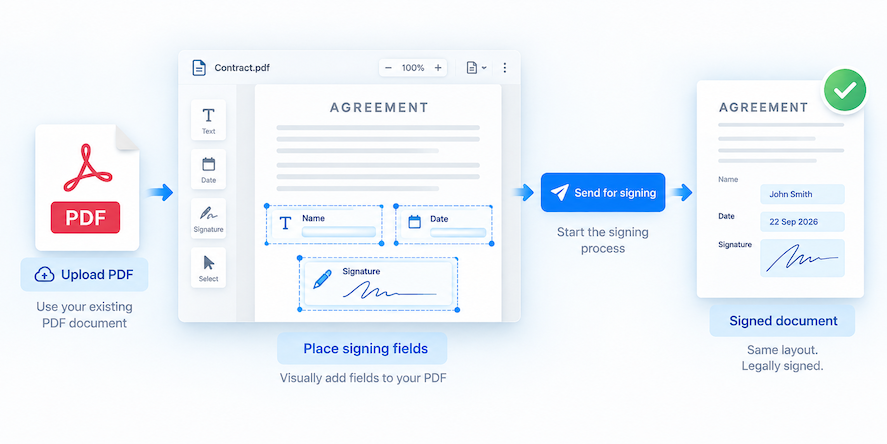
Sometimes you do not need a long-term template. You just have a PDF that needs to be signed.
AuthorizeDoc now supports a more direct “from PDF” flow for this situation. Upload a PDF, prepare the fields, and continue into the signing process without first rebuilding the document somewhere else.
When to use the “from PDF” flow
Use this flow when you have a PDF ready and want to send it for signing quickly.
It is a good fit for:
- One-off agreements.
- Customer-specific PDFs.
- Documents exported from another platform.
- Forms that do not need to become permanent templates.
- Files where the PDF layout should stay exactly as uploaded.
If the same document will be used many times, creating a reusable PDF template may be better. If it is mostly a one-off document, the direct PDF flow is faster.
How the flow works
The process is designed to keep the PDF as the source document.
- Upload the PDF.
- AuthorizeDoc checks the PDF for existing placeholders.
- If placeholders are found, they are used in the setup flow.
- If no placeholders are found, you can add fields visually on the PDF.
- Review the fields.
- Continue with the normal signing workflow.
This gives you flexibility. PDFs that already contain supported placeholders can move quickly through setup, while plain PDFs can still be prepared manually.
Adding fields when the PDF has no placeholders
Many PDFs will not contain predefined placeholders. In that case, AuthorizeDoc lets you open the PDF preview and add the fields yourself.
This is useful when the document came from another system or was designed without AuthorizeDoc in mind.
You can place fields where the signer should enter information or apply a signature. After that, the document continues into the same signing process as other documents.
Why this helps
The direct PDF flow reduces friction for everyday signing tasks.
You do not need to:
- Recreate the document in Word.
- Convert the PDF into another format.
- Add invisible markup before upload.
- Build a reusable template for a one-time document.
Instead, the PDF stays the PDF. You prepare it, send it, and collect the signature.
PDF templates vs. from PDF
Both features use PDFs, but they solve slightly different problems.
Use a PDF template when the same document will be reused many times.
Use the “from PDF” flow when you have a specific PDF that needs to be signed now.
Together, they make it easier to handle both repeatable document processes and one-off PDF signing requests in AuthorizeDoc.